|
`-=[]⟨⟩\;',./~!@#$%^&*()_+{}|:"<>? 𝑎𝑏𝑐𝑑𝑒𝑓𝑔ℎ𝑖𝑗𝑘𝑙𝑚𝑛𝑜𝑝𝑞𝑟𝑠𝑡𝑢𝑣𝑤𝑥𝑦𝑧
Å − × ⋅∓±∘꞊﹦∗∙ ℯ 𝔸𝔹ℂ𝔻𝔼𝔽𝔾ℍ𝕀𝕁𝕂𝕃𝕄ℕ𝕆ℙℚℝ𝕊𝕋𝕌𝕍𝕎𝕏𝕐ℤ𝐴𝐵𝐶𝐷𝐸𝐹𝐺𝐻𝐼𝐽𝐾𝐿𝑀𝑁𝑂𝑃𝑄𝑅𝑆𝑇𝑈𝑉𝑊𝑋𝑌𝑍
∼∽∾≁≂≃≄≅≆≇≈≉≌≐≠≡ ≤≥≦≧≨≩≪≫
∈∉∊∋∌∍ ⊂⊃⊄⊅⊆⊇ 𝛼𝛽𝛾𝛿𝜀𝜁𝜂𝜃𝜄𝜅𝜆𝜇𝜈𝜉𝜊𝜋𝜌𝜎𝜏𝜐𝜑𝜒𝜓𝜔
∀∂∃∅⦰∆∇∎∞∝∴∵ ∏∐∑⋀⋁⋂⋃ ∧∨∩∪
∫∬∭∮∯∰∱∲∳ ∥⋮⋯⋰⋱ ‖ ′ ″ ‴ ⁄ ⁗ ʹ ʺ ‵ ‶ ‷
﹁ ﹂ ﹃ ﹄ ︹ ︺ ︻ ︼ ︗ ︘ ︿ ﹀ ︽ ︾ ﹇ ﹈ ︷ ︸ ⏜ ⏝ ⎴ ⎵ ⏞ ⏟ ⏠ ⏡
←↑→↓↤↦↥↧↔↕↖↗↘↙▲▼◀▶↺↻⟲⟳ ↼↽↾↿⇀⇁⇂⇃⇄⇅⇆⇇ ⇐⇑⇒⇓⇔⇌⇍⇏⇕⇖⇗⇘⇙⇙⇳⥢⥣⥤⥥⥦⥧⥨⥩⥪⥫⥬⥭⥮⥯
Draft for Information Only
Content
Python Binary Sequence Types
 Python Bytes Objects
  Python Bytes Object Properties
   ASCII Charactes
   Sequence of Integer
  Python Bytes Literals
  Python Bytes Constructor
   Parameters
   Remarks
  Python Bytes Methods
 Python Bytearray Objects
  Python Bytearray Constructor
   Parameters
   Remarks
  Python Bytearray Methods
 Bytes and Bytearray Operations
 Source and Reference
Python Binary Sequence Types
Python binary data is implemented as Python binary sequence types which are handled by predefined bytes, bytearray, and memoryview iteration objects.
Both bytes, and bytearray are used to manipulate binary data and are supported by memoryview. memoryview is used to access the binary data of a binary object stored in the memory through the buffer protocol directly without making a copy. Besides, bytearray is also supported by the array module with efficient storage of basic data types like 32-bit integers and IEEE754 double-precision floating values.
Python Bytes Objects
Bytes objects are immutable sequences of single bytes.
Python Bytes Object Properties
ASCII Charactes
Many major binary protocols are based on ASCII text encoding, several methods are only valid when working with ASCII compatible data and are closely related to string objects in a variety of other ways.
    Only ASCII characters are permitted in bytes literals (regardless of the declared source code encoding). Any binary values over 127 must be entered into bytes literals using the appropriate escape sequence.

    While bytes literals and representations are based on ASCII text, bytes objects actually behave like immutable sequences of integers, with each value in the sequence restricted such that 0 <= x < 256 (attempts to violate this restriction will trigger ValueError). This is done deliberately to emphasise that while many binary formats include ASCII based elements and can be usefully manipulated with some text-oriented algorithms, this is not generally the case for arbitrary binary data (blindly applying text processing algorithms to binary data formats that are not ASCII compatible will usually lead to data corruption).
Sequence of Integer
Since bytes objects are sequences of integers (akin to a tuple), for a bytes object b, b[0] will be an integer, while b[0:1] will be a bytes object of length 1. (This contrasts with text strings, where both indexing and slicing will produce a string of length 1)
The representation of bytes objects uses the literal format (b'...') since it is often more useful than e.g. bytes([46, 46, 46]). You can always convert a bytes object into a list of integers using list(b).
Note
For Python 2.x users: In the Python 2.x series, a variety of implicit conversions between 8-bit strings (the closest thing 2.x offers to a built-in binary data type) and Unicode strings were permitted. This was a backwards compatibility workaround to account for the fact that Python originally only supported 8-bit text, and Unicode text was a later addition. In Python 3.x, those implicit conversions are gone - conversions between 8-bit binary data and Unicode text must be explicit, and bytes and string objects will always compare unequal.
Python Bytes Literals
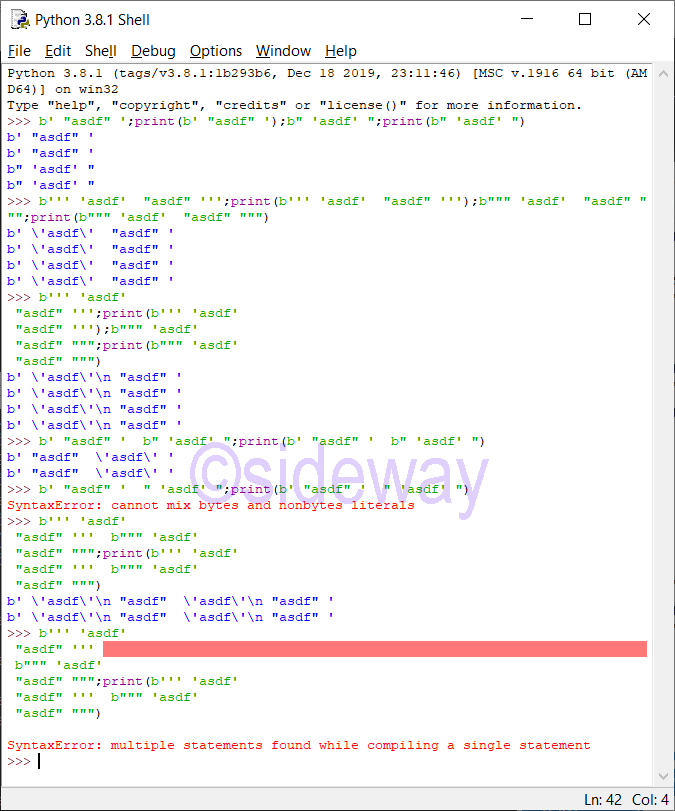
Python bytes may be constructed by bytes literals.
Bytes LiteralsSingle quotes: For allowing embedded double quotes. e.g. b'allows embedded "double" quotes'
Double quotes: For allowing embedded single quotes. e.g. b"allows embedded 'single' quotes"
Triple quoted: For allowing embedded single and double quotes. Besides triple quoted strings may span multiple lines and all associated whitespace will be included in the bytes literal. e.g. b'''Three single quotes''', b"""Three double quotes"""
Besides, a single expression of several textual literals separated by whitespace only will be implicitly converted to a single textual literal.
Python Bytes Constructor
The Python bytes constructor is class bytes
class bytes([source[, encoding[, errors]]])
Parameters
class bytesto return a bytes object
sourceoptional argument used to specify the binary data source
encodingoptional argument, valid only if source is given, used to the encoding of source
errorsoptional argument, valid only if encoding is given, used to specify the error handling method
Remarks
- bytes literal is usually used as
source
- if
source is not given, bytes() return an empty bytes object b''
source of special value can be used to create some typical bytes object:
- zero-filled bytes object of a specified length. e.g.
bytes(10)
- bytes object of a specified range. e.g.
bytes(range(20))
- bytes object by copying existing binary data via the buffer protocol. e.g.
bytes(obj)
Since 2 hexadecimal digits correspond precisely to a single byte, hexadecimal numbers are a commonly used format for describing binary data. Accordingly, the bytes type has an additional class method to read data in that format:
Python Bytes Methods
classmethod bytes.fromhex(string)a bytes-classmethod to return a bytes object by decoding the given string object. Form of string is two hexadecimal digits per byte and ASCII whitespace will be ignored.
𝑏𝑦𝑡𝑒𝑠.hex([sep[, bytes_per_sep]])to return a string object of form two hexadecimal digits per byte from 𝑏𝑦𝑡𝑒𝑠 with output pattern according to the optional specified delimiter sep and optional specified length per byte bytes_per_sep. bytes_per_sep with positive values calculate the separator position from the right, while negative values from the left.
Python Bytearray Objects
Bytearray objects are a mutable counterpart to bytes objects. There is no dedicated literal syntax for bytearray objects, instead they are always created by calling the constructor
Python Bytearray Constructor
The Python bytearray constructor is class bytearray
class bytearray([source[, encoding[, errors]]])
Parameters
class bytearrayto return a bytearray object
sourceoptional argument used to specify the binary data source
encodingoptional argument, valid only if source is given, used to the encoding of source
errorsoptional argument, valid only if encoding is given, used to specify the error handling method
Remarks
- There is no dedicated literal syntax for bytearray objects. Bytes literal is also usually used as
source
- if
source is not given, bytes() return an empty bytes object b''
source of special value can be used to create some typical bytes object:
- zero-filled bytes object of a specified length. e.g.
bytes(10)
- bytes object of a specified range. e.g.
bytes(range(20))
- bytes object by copying existing binary data via the buffer protocol. e.g.
bytes(obj)
As bytearray objects are mutable, they support the mutable sequence operations in addition to the common bytes and bytearray operations described in Bytes and Bytearray Operations.

Also see the bytearray built-in.

Since 2 hexadecimal digits correspond precisely to a single byte, hexadecimal numbers are a commonly used format for describing binary data. Accordingly, the bytearray type has an additional class method to read data in that format:
Python Bytearray Methods
classmethod bytearray.fromhex(string)a bytearray-classmethod to return a bytearray object by decoding the given string object. Form of string is two hexadecimal digits per byte and ASCII whitespace will be ignored.
hex([sep[, bytes_per_sep]])Return a string object containing two hexadecimal digits for each byte in the instance.
>>>
>>> bytearray(b'\xf0\xf1\xf2').hex()
'f0f1f2'
New in version 3.5.
Changed in version 3.8: Similar to bytes.hex(), 𝑏𝑦𝑡𝑒𝑎𝑟𝑟𝑎𝑦.hex() now supports optional sep and bytes_per_sep parameters to insert separators between bytes in the hex output.
Since bytearray objects are sequences of integers (akin to a list), for a bytearray object b, b[0] will be an integer, while b[0:1] will be a bytearray object of length 1. (This contrasts with text strings, where both indexing and slicing will produce a string of length 1)
The representation of bytearray objects uses the bytes literal format (bytearray(b'...')) since it is often more useful than e.g. bytearray([46, 46, 46]). You can always convert a bytearray object into a list of integers using list(b).
Bytes and Bytearray Operations
Both bytes and bytearray objects support the common sequence operations. They interoperate not just with operands of the same type, but with any bytes-like object. Due to this flexibility, they can be freely mixed in operations without causing errors. However, the return type of the result may depend on the order of operands.

Note

The methods on bytes and bytearray objects don’t accept strings as their arguments, just as the methods on strings don’t accept bytes as their arguments. For example, you have to write:

a = "abc"
b = a.replace("a", "f")

and:

a = b"abc"
b = a.replace(b"a", b"f")

Some bytes and bytearray operations assume the use of ASCII compatible binary formats, and hence should be avoided when working with arbitrary binary data. These restrictions are covered below.

Note

Using these ASCII based operations to manipulate binary data that is not stored in an ASCII based format may lead to data corruption.

The following methods on bytes and bytearray objects can be used with arbitrary binary data.
𝑏𝑦𝑡𝑒𝑠.count(sub[, start[, end]])𝑏𝑦𝑡𝑒𝑎𝑟𝑟𝑎𝑦.count(sub[, start[, end]])to return the number of non-overlapping occurrences of the specified subsequence sub in 𝑏𝑦𝑡𝑒𝑠 or 𝑏𝑦𝑡𝑒𝑎𝑟𝑟𝑎𝑦 within the optional range specified by one argument start, or two arguments start and end. The subsequence sub may be any bytes-like object or an integer in the range 0 to 255.
𝑏𝑦𝑡𝑒𝑠.decode(encoding="utf-8", errors="strict")𝑏𝑦𝑡𝑒𝑎𝑟𝑟𝑎𝑦.decode(encoding="utf-8", errors="strict")to return a string from 𝑏𝑦𝑡𝑒𝑠 or 𝑏𝑦𝑡𝑒𝑎𝑟𝑟𝑎𝑦 by decoding according to the specified encoding encoding and error handling scheme errors. Default encoding is 'utf-8' and default errors is 'strict, meaning that encoding errors raise a UnicodeError. Other possible values are 'ignore', 'replace' and any other name registered via codecs.register_error(), etc. By passing the encoding argument to 𝑠𝑡𝑟 allows decoding any bytes-like object directly, without needing to make a temporary bytes or bytearray object.
𝑏𝑦𝑡𝑒𝑠.endswith(suffix[, start[, end]])𝑏𝑦𝑡𝑒𝑎𝑟𝑟𝑎𝑦.endswith(suffix[, start[, end]])to return a True if the speicified suffix is found at the end of 𝑏𝑦𝑡𝑒𝑠 or 𝑏𝑦𝑡𝑒𝑎𝑟𝑟𝑎𝑦 within the optional range specified by one argument start, or two arguments start and end, otherwise return a False. The specified suffix can also be a tuple of suffixes being look for. The suffix(es) to search for may be any bytes-like object.
𝑏𝑦𝑡𝑒𝑠.find(sub[, start[, end]])𝑏𝑦𝑡𝑒𝑎𝑟𝑟𝑎𝑦.find(sub[, start[, end]])to return the lowest index of subsequence sub in 𝑏𝑦𝑡𝑒𝑠 or 𝑏𝑦𝑡𝑒𝑎𝑟𝑟𝑎𝑦 within the optional range specified by one argument start, or two arguments start and end. -1 will be returned if sub is not found. The subsequence to search for may be any bytes-like object or an integer in the range 0 to 255.
𝑏𝑦𝑡𝑒𝑠.index(sub[, start[, end]])𝑏𝑦𝑡𝑒𝑎𝑟𝑟𝑎𝑦.index(sub[, start[, end]])to return the lowest index of subsequence sub in 𝑏𝑦𝑡𝑒𝑠 or 𝑏𝑦𝑡𝑒𝑎𝑟𝑟𝑎𝑦 within the optional range specified by one argument start, or two arguments start and end. But will raise ValueError instead of -1 while using 𝑏𝑦𝑡𝑒𝑠.find(sub[, start[, end]])) or 𝑏𝑦𝑡𝑒𝑎𝑟𝑟𝑎𝑦.find(sub[, start[, end]])) if subsequence sub is not found. The subsequence to search for may be any bytes-like object or an integer in the range 0 to 255.
𝑏𝑦𝑡𝑒𝑠.join(iterable)𝑏𝑦𝑡𝑒𝑎𝑟𝑟𝑎𝑦.join(iterable)to return a concatenated bytes or bytearray object by concatenating the binary data sequences in iterable with delimiter 𝑠𝑡𝑟. A TypeError will be raised if there are any non-bytes-like objects in iterable, including string objects. The delimiter between elements is the contents of the bytes or bytearray object providing this method.
static 𝑏𝑦𝑡𝑒𝑠.maketrans(from, to)static bytearray.maketrans(from, to)a static method used to return a translation table usable for 𝑏𝑦𝑡𝑒𝑠.translate() that will map each character in from into the character at the same position in to; from and to must both be bytes-like objects and have the same length.
𝑏𝑦𝑡𝑒𝑠.partition(sep)𝑏𝑦𝑡𝑒𝑎𝑟𝑟𝑎𝑦.partition(sep)to return a 3-tuple from 𝑏𝑦𝑡𝑒𝑠 or 𝑏𝑦𝑡𝑒𝑎𝑟𝑟𝑎𝑦 by spliting the sequence into three parts, with the first tuple is the part before the first occurrence of specified sep, the second tuple is the separator sep, and the third tuple is the part after the first occurrence of specified sep. If the separator is not found, then a 3-tuple with the string itself, followed by two empty bytes or bytearray will be returned. The separator to search for may be any bytes-like object.
𝑏𝑦𝑡𝑒𝑠.replace(old, new[, count])𝑏𝑦𝑡𝑒𝑎𝑟𝑟𝑎𝑦.replace(old, new[, count])to return a sequence from 𝑏𝑦𝑡𝑒𝑠 or 𝑏𝑦𝑡𝑒𝑎𝑟𝑟𝑎𝑦 with the specified subsequence old is replaced by the specified subsequence new according to the optional specified count occurrences from the beginnine of sequence. By default, all occurrences will be replaced if argument count is not given. The subsequence to search for and its replacement may be any bytes-like object. The bytearray version of this method does not operate in place - it always produces a new object, even if no changes were made.
𝑏𝑦𝑡𝑒𝑠.rfind(sub[, start[, end]])𝑏𝑦𝑡𝑒𝑎𝑟𝑟𝑎𝑦.rfind(sub[, start[, end]])to return the highest index of sub in 𝑏𝑦𝑡𝑒𝑠 or 𝑏𝑦𝑡𝑒𝑎𝑟𝑟𝑎𝑦 within the optional range specified by one argument start, or two arguments start and end. -1 will be returned if sub is not found. The subsequence to search for may be any bytes-like object or an integer in the range 0 to 255.
𝑏𝑦𝑡𝑒𝑠.rindex(sub[, start[, end]])𝑏𝑦𝑡𝑒𝑎𝑟𝑟𝑎𝑦.rindex(sub[, start[, end]])to return the lowest index of sub in 𝑏𝑦𝑡𝑒𝑠 or 𝑏𝑦𝑡𝑒𝑎𝑟𝑟𝑎𝑦 within the optional range specified by one argument start, or two arguments start and end. But will raise ValueError instead of -1 while using 𝑠𝑡𝑟.find(sub[, start[, end]])) if sub is not found. The subsequence to search for may be any bytes-like object or an integer in the range 0 to 255.
𝑏𝑦𝑡𝑒𝑠.rpartition(sep)𝑏𝑦𝑡𝑒𝑎𝑟𝑟𝑎𝑦.rpartition(sep)to return a 3-tuple from 𝑏𝑦𝑡𝑒𝑠 or 𝑏𝑦𝑡𝑒𝑎𝑟𝑟𝑎𝑦 by spliting the string into three parts, with the first tuple is the part before the last occurrence of specified sep, the second tuple is the separator sep, and the third tuple is the part after the last occurrence of specified sep. If the separator is not found, then a 3-tuple with two empty bytes or bytearray objects, followed by the original sequence copy will be returned. The separator to search for may be any bytes-like object.
𝑏𝑦𝑡𝑒𝑠.startswith(prefix[, start[, end]])𝑏𝑦𝑡𝑒𝑎𝑟𝑟𝑎𝑦.startswith(prefix[, start[, end]])to return a True if 𝑏𝑦𝑡𝑒𝑠 or 𝑏𝑦𝑡𝑒𝑎𝑟𝑟𝑎𝑦 starts with the given prefix within the optional range specified by one argument start, or two arguments start and end, otherwise return False. The prefix(es) to search for may be any bytes-like object. prefix can also be a tuple of prefixes to look for.
𝑏𝑦𝑡𝑒𝑠.translate(table, /, delete=b'')𝑏𝑦𝑡𝑒𝑎𝑟𝑟𝑎𝑦.translate(table, /, delete=b'')to return a bytes or bytearray object from 𝑏𝑦𝑡𝑒𝑠 or 𝑏𝑦𝑡𝑒𝑎𝑟𝑟𝑎𝑦 by mapping each character to a given translation table table
Return a copy of the bytes or bytearray object where all bytes occurring in the optional argument delete are removed, and the remaining bytes have been mapped through the given translation table, which must be a bytes object of length 256.
You can use the 𝑏𝑦𝑡𝑒𝑠.maketrans() method to create a translation table.
Set the table argument to None for translations that only delete characters:
>>>
>>> b'read this short text'.translate(None, b'aeiou')
b'rd ths shrt txt'
Changed in version 3.6: delete is now supported as a keyword argument.
The following methods on bytes and bytearray objects have default behaviours that assume the use of ASCII compatible binary formats, but can still be used with arbitrary binary data by passing appropriate arguments. Note that all of the bytearray methods in this section do not operate in place, and instead produce new objects.
𝑏𝑦𝑡𝑒𝑠.center(width[, fillbyte])𝑏𝑦𝑡𝑒𝑎𝑟𝑟𝑎𝑦.center(width[, fillbyte])to return a bytes or bytearray object from 𝑏𝑦𝑡𝑒𝑠 or 𝑏𝑦𝑡𝑒𝑎𝑟𝑟𝑎𝑦 with the whole sequence is centered within the specified length width by padding with the optional specified fillbyte. The default fillbyte is an ASCII space. For bytes objects, if the specified width is less than or equal to len(𝑠), then the orginal sequence s is returned. The bytearray version of this method does not operate in place - it always produces a new object, even if no changes were made.
𝑏𝑦𝑡𝑒𝑠.ljust(width[, fillbyte])𝑏𝑦𝑡𝑒𝑎𝑟𝑟𝑎𝑦.ljust(width[, fillbyte])to return a bytes or bytearray object from 𝑏𝑦𝑡𝑒𝑠 or 𝑏𝑦𝑡𝑒𝑎𝑟𝑟𝑎𝑦 with the whole sequence is left justified within the specified length width by padding with the optional specified fillbyte. The default fillbyte is an ASCII space. For bytes objects, if the specified width is less than or equal to len(𝑠), then the orginal sequence 𝑠 is returned. The bytearray version of this method does not operate in place - it always produces a new object, even if no changes were made.
𝑏𝑦𝑡𝑒𝑠.lstrip([chars])𝑏𝑦𝑡𝑒𝑎𝑟𝑟𝑎𝑦.lstrip([chars])to return a bytes or bytearray object from 𝑏𝑦𝑡𝑒𝑠 or 𝑏𝑦𝑡𝑒𝑎𝑟𝑟𝑎𝑦 with the optional specified leading binary sequence chars are removed until reaching a byte that is not contained in the set of byte values in chars. The default chars is whitespace, if argument chars is omitted or None. Argument chars is used to specify all combinations of the set of byte values to be stripped from, not a specific prefix byte values to be removed. The binary sequence of byte values to remove may be any bytes-like object. he bytearray version of this method does not operate in place - it always produces a new object, even if no changes were made.
𝑏𝑦𝑡𝑒𝑠.rjust(width[, fillbyte])𝑏𝑦𝑡𝑒𝑎𝑟𝑟𝑎𝑦.rjust(width[, fillbyte])to return aa bytes or bytearray object from 𝑏𝑦𝑡𝑒𝑠 or 𝑏𝑦𝑡𝑒𝑎𝑟𝑟𝑎𝑦 with the whole sequence is right justified within the specified length width by padding with the optional specified fillbyte. The default fillbyte is an ASCII space. For bytes objects, if the specified width is less than or equal to len(𝑠), then the orginal sequence 𝑠 is returned. The bytearray version of this method does not operate in place - it always produces a new object, even if no changes were made.
𝑏𝑦𝑡𝑒𝑠.rsplit(sep=None, maxsplit=-1)𝑏𝑦𝑡𝑒𝑎𝑟𝑟𝑎𝑦.rsplit(sep=None, maxsplit=-1)to return a list of the subsequences from 𝑏𝑦𝑡𝑒𝑠 or 𝑏𝑦𝑡𝑒𝑎𝑟𝑟𝑎𝑦 by spliting with the specified delimiter sep according to the given count maxsplit. In other words, the list will have at most maxsplit+1 elements, the rightmost ones. If maxsplit is not specified or equal to -1, then all possible splits will be carried out. Splitting an empty sequence will always returns a list with an empty string. If delimiter sep is given, spliting two consecutive delimiters in 𝑠𝑡𝑟 will return an empty ssequence. The delimiter argument sep may be multiple characters.
𝑏𝑦𝑡𝑒𝑠.rstrip([chars])𝑏𝑦𝑡𝑒𝑎𝑟𝑟𝑎𝑦.rstrip([chars])to return a sequence from 𝑏𝑦𝑡𝑒𝑠 or 𝑏𝑦𝑡𝑒𝑎𝑟𝑟𝑎𝑦 with the optional specified trailing characters chars are removed until reaching a byte value that is not contained in the set of byte values in chars. The default chars is ASCII whitespace, if argument chars is omitted or None. Argument chars is used to specify all combinations of the set of byte values to be stripped from, not a specific prefix bytes to be removed. The binary sequence of byte values to remove may be any bytes-like object. The bytearray version of this method does not operate in place - it always produces a new object, even if no changes were made.
𝑏𝑦𝑡𝑒𝑠.split(sep=None, maxsplit=-1)𝑏𝑦𝑡𝑒𝑎𝑟𝑟𝑎𝑦.split(sep=None, maxsplit=-1)to return a list of the subsequence from 𝑏𝑦𝑡𝑒𝑠 or 𝑏𝑦𝑡𝑒𝑎𝑟𝑟𝑎𝑦 by spliting with the specified delimiter sep according to the given count maxsplit. In other words, the list will have at most maxsplit+1 elements. If maxsplit is not specified or equal to -1, then all possible splits will be carried out. Splitting an empty sequence will always returns a list with an empty sequence. If delimiter sep is given, spliting two consecutive delimiters in 𝑏𝑦𝑡𝑒𝑠 or 𝑏𝑦𝑡𝑒𝑎𝑟𝑟𝑎𝑦 will return an empty sequence. The delimiter argument sep may be multiple characters.
If sep is given, consecutive delimiters are not grouped together and are deemed to delimit empty subsequences (for example, b'1,,2'.split(b',') returns [b'1', b'', b'2']). The sep argument may consist of a multibyte sequence (for example, b'1<>2<>3'.split(b'<>') returns [b'1', b'2', b'3']). Splitting an empty sequence with a specified separator returns [b''] or [bytearray(b'')] depending on the type of object being split. The sep argument may be any bytes-like object.
If sep is not specified or is None, a different splitting algorithm is applied: runs of consecutive ASCII whitespace are regarded as a single separator, and the result will contain no empty strings at the start or end if the sequence has leading or trailing whitespace. Consequently, splitting an empty sequence or a sequence consisting solely of ASCII whitespace without a specified separator returns [].
For example:
>>>
>>> b'1 2 3'.split()
[b'1', b'2', b'3']
>>> b'1 2 3'.split(maxsplit=1)
[b'1', b'2 3']
>>> b' 1 2 3 '.split()
[b'1', b'2', b'3']
𝑏𝑦𝑡𝑒𝑠.strip([chars])𝑏𝑦𝑡𝑒𝑎𝑟𝑟𝑎𝑦.strip([chars])to return a sequence from 𝑏𝑦𝑡𝑒𝑠 or 𝑏𝑦𝑡𝑒𝑎𝑟𝑟𝑎𝑦 with the optional specified leading and trailing byte values chars are removed until reaching a byte value that is not contained in the set of byte values in chars. The default chars is ASCII whitespace, if argument chars is omitted or None. Argument chars is used to specify all combinations of the set of byte values to be stripped from, not a specific prefix or suffix byte values to be removed. The binary sequence of byte values to remove may be any bytes-like object. The bytearray version of this method does not operate in place - it always produces a new object, even if no changes were made.
The following methods on bytes and bytearray objects assume the use of ASCII compatible binary formats and should not be applied to arbitrary binary data. Note that all of the bytearray methods in this section do not operate in place, and instead produce new objects.
𝑏𝑦𝑡𝑒𝑠.capitalize()𝑏𝑦𝑡𝑒𝑎𝑟𝑟𝑎𝑦.capitalize()to return a sequence from 𝑏𝑦𝑡𝑒𝑠 or 𝑏𝑦𝑡𝑒𝑎𝑟𝑟𝑎𝑦 with each byte interpreted as an ASCII character, and the first byte capitalized and the rest lowercased. Non-ASCII byte values are passed through unchanged. The bytearray version of this method does not operate in place - it always produces a new object, even if no changes were made.
𝑏𝑦𝑡𝑒𝑠.expandtabs(tabsize=8)𝑏𝑦𝑡𝑒𝑎𝑟𝑟𝑎𝑦.expandtabs(tabsize=8)to return a sequence from 𝑏𝑦𝑡𝑒𝑠 or 𝑏𝑦𝑡𝑒𝑎𝑟𝑟𝑎𝑦 with all ASCII tab characters are replaced by one or more ASCII spaces according to the specified tabsize and the column position of the tab character. The default tabsize is 8. In other words, tab column positions are at 0, 8, ⋯. To expand the sequence, the current column is set to zero and the sequence is examined byte by byte. A tab character will always be will replaced by one to tabsize spaces such that the last added space will always be the space be next tab column position. If the byte is an ASCII tab character (b'\t'), one or more space characters are inserted in the result until the current column is equal to the next tab position. (The tab character itself is not copied.) If the current byte is an ASCII newline (b'\n') or carriage return (b'\r'), it is copied and the current column is reset to zero. Any other byte value is copied unchanged and the current column is incremented by one regardless of how the byte value is represented when printed. The bytearray version of this method does not operate in place - it always produces a new object, even if no changes were made.
𝑏𝑦𝑡𝑒𝑠.isalnum()𝑏𝑦𝑡𝑒𝑎𝑟𝑟𝑎𝑦.isalnum()to return a True if all bytes in 𝑏𝑦𝑡𝑒𝑠 or 𝑏𝑦𝑡𝑒𝑎𝑟𝑟𝑎𝑦, which is not empty, are alphabetical ASCII characters or ASCII decimal digits, otherwise return a False. Alphabetic ASCII characters are those byte values in the sequence b'abcdefghijklmnopqrstuvwxyzABCDEFGHIJKLMNOPQRSTUVWXYZ'. ASCII decimal digits are those byte values in the sequence b'0123456789'.
𝑏𝑦𝑡𝑒𝑠.isalpha()𝑏𝑦𝑡𝑒𝑎𝑟𝑟𝑎𝑦.isalpha()to return a True if all bytes in 𝑏𝑦𝑡𝑒𝑠 or 𝑏𝑦𝑡𝑒𝑎𝑟𝑟𝑎𝑦, which is not empty, are alphabetic ASCII characters, otherwise return a False. Alphabetic ASCII characters are those byte values in the sequence b'abcdefghijklmnopqrstuvwxyzABCDEFGHIJKLMNOPQRSTUVWXYZ'.
𝑏𝑦𝑡𝑒𝑠.isascii()𝑏𝑦𝑡𝑒𝑎𝑟𝑟𝑎𝑦.isascii()to return a True if 𝑏𝑦𝑡𝑒𝑠 or 𝑏𝑦𝑡𝑒𝑎𝑟𝑟𝑎𝑦 is empty or all bytes in 𝑏𝑦𝑡𝑒𝑠 or 𝑏𝑦𝑡𝑒𝑎𝑟𝑟𝑎𝑦, are ASCII characters, otherwise return a False. ASCII characters have code points in the range U+0000-U+007F (0-0x7F).
𝑏𝑦𝑡𝑒𝑠.isdigit()𝑏𝑦𝑡𝑒𝑎𝑟𝑟𝑎𝑦.isdigit()to return a True if all bytes in 𝑏𝑦𝑡𝑒𝑠 or 𝑏𝑦𝑡𝑒𝑎𝑟𝑟𝑎𝑦, which is not empty, are ASCII decimal digits, otherwise return a False. ASCII decimal digits are those byte values in the sequence b'0123456789'.
𝑏𝑦𝑡𝑒𝑠.islower()𝑏𝑦𝑡𝑒𝑎𝑟𝑟𝑎𝑦.islower()to return a True if there is at least one lowercase ASCII character in the sequence in 𝑏𝑦𝑡𝑒𝑠 or 𝑏𝑦𝑡𝑒𝑎𝑟𝑟𝑎𝑦 and no uppercase ASCII characters, otherwise return a False. Lowercase ASCII characters are those byte values in the sequence b'abcdefghijklmnopqrstuvwxyz'. Uppercase ASCII characters are those byte values in the sequence b'ABCDEFGHIJKLMNOPQRSTUVWXYZ'.
𝑏𝑦𝑡𝑒𝑠.isspace()𝑏𝑦𝑡𝑒𝑎𝑟𝑟𝑎𝑦.isspace()to return a True if all bytes in 𝑏𝑦𝑡𝑒𝑠 or 𝑏𝑦𝑡𝑒𝑎𝑟𝑟𝑎𝑦, which is not empty, are ASCII whitespace characters only, otherwise return a False. ASCII whitespace characters are those byte values in the sequence b' \t\n\r\x0b\f' (space, tab, newline, carriage return, vertical tab, form feed).
𝑏𝑦𝑡𝑒𝑠.istitle()𝑏𝑦𝑡𝑒𝑎𝑟𝑟𝑎𝑦.istitle()to return a True if the 𝑏𝑦𝑡𝑒𝑠 or 𝑏𝑦𝑡𝑒𝑎𝑟𝑟𝑎𝑦 is not empty and is ASCII titlecased, otherwise return a False.
𝑏𝑦𝑡𝑒𝑠.isupper()𝑏𝑦𝑡𝑒𝑎𝑟𝑟𝑎𝑦.isupper()to return a True if there is at least one uppercase alphabetic ASCII character in 𝑏𝑦𝑡𝑒𝑠 or 𝑏𝑦𝑡𝑒𝑎𝑟𝑟𝑎𝑦, and no lowercase ASCII characters, otherwise return a False. Lowercase ASCII characters are those byte values in the sequence b'abcdefghijklmnopqrstuvwxyz'. Uppercase ASCII characters are those byte values in the sequence b'ABCDEFGHIJKLMNOPQRSTUVWXYZ'.
𝑏𝑦𝑡𝑒𝑠.lower()𝑏𝑦𝑡𝑒𝑎𝑟𝑟𝑎𝑦.lower()to return a sequence from 𝑏𝑦𝑡𝑒𝑠 or 𝑏𝑦𝑡𝑒𝑎𝑟𝑟𝑎𝑦 with all ASCII cased character are converted to corresponding lowercase counterpart. Lowercase ASCII characters are those byte values in the sequence b'abcdefghijklmnopqrstuvwxyz'. Uppercase ASCII characters are those byte values in the sequence b'ABCDEFGHIJKLMNOPQRSTUVWXYZ'. The bytearray version of this method does not operate in place - it always produces a new object, even if no changes were made.
𝑏𝑦𝑡𝑒𝑠.splitlines(keepends=False)𝑏𝑦𝑡𝑒𝑎𝑟𝑟𝑎𝑦.splitlines(keepends=False)to return a list of the lines from 𝑏𝑦𝑡𝑒𝑠 or 𝑏𝑦𝑡𝑒𝑎𝑟𝑟𝑎𝑦 by breaking at ASCII line boundaries. Line boundaries is a superset of universal boundaries, e.g. \n Line Feed, \r Carriage Return, \r\n Carriage Return + Line Feed, \v or \x0b Line Tabulation, \f or \x0c Form Feed, \x1c File Separator, \x1d Group Separator, \x1e Record Separator, \x85 Next Line (C1 Control Code), \u2028 Line Separator, \u2029 Paragraph Separator etc. Line breask are not included in the resulting list unless argument keepends is given and true. Unlike split() splitlines returns an empty list for the empty string, and a terminal line break does not result in an extra line.
𝑏𝑦𝑡𝑒𝑠.swapcase()𝑏𝑦𝑡𝑒𝑎𝑟𝑟𝑎𝑦.swapcase()to return a sequence from 𝑏𝑦𝑡𝑒𝑠 or 𝑏𝑦𝑡𝑒𝑎𝑟𝑟𝑎𝑦 with uppercase characters converted to corresponding lowercase counterpart and vice versa. Lowercase ASCII characters are those byte values in the sequence b'abcdefghijklmnopqrstuvwxyz'. Uppercase ASCII characters are those byte values in sequence b'ABCDEFGHIJKLMNOPQRSTUVWXYZ'. Unlike 𝑠𝑡𝑟.swapcase(), it is always the case that bin.swapcase().swapcase() == bin for the binary versions. Case conversions are symmetrical in ASCII, even though that is not generally true for arbitrary Unicode code points. The bytearray version of this method does not operate in place - it always produces a new object, even if no changes were made.
𝑏𝑦𝑡𝑒𝑠.title()𝑏𝑦𝑡𝑒𝑎𝑟𝑟𝑎𝑦.title()to return a binary sequence from 𝑏𝑦𝑡𝑒𝑠 or 𝑏𝑦𝑡𝑒𝑎𝑟𝑟𝑎𝑦 by converting to a titlecased version with all words are of first uppercase ASCII character and others lowercase characters. Uncased byte values are left unmodified. Lowercase ASCII characters are those byte values in sequence b'abcdefghijklmnopqrstuvwxyz'. Uppercase ASCII characters are those byte values in sequence b'ABCDEFGHIJKLMNOPQRSTUVWXYZ'. All other byte values are uncased. The bytearray version of this method does not operate in place - it always produces a new object, even if no changes were made.
The algorithm uses a simple language-independent definition of a word as groups of consecutive letters. The definition works in many contexts but it means that apostrophes in contractions and possessives form word boundaries, which may not be the desired result:
>>>
>>> b"they're bill's friends from the UK".title()
b"They'Re Bill'S Friends From The Uk"
A workaround for apostrophes can be constructed using regular expressions:
>>>
>>> import re
>>> def titlecase(s):
... return re.sub(rb"[A-Za-z]+('[A-Za-z]+)?",
... lambda mo: mo.group(0)[0:1].upper() +
... mo.group(0)[1:].lower(),
... s)
...
>>> titlecase(b"they're bill's friends.")
b"They're Bill's Friends."
Note
𝑏𝑦𝑡𝑒𝑠.upper()𝑏𝑦𝑡𝑒𝑎𝑟𝑟𝑎𝑦.upper()to return a sequence from 𝑏𝑦𝑡𝑒𝑠 or 𝑏𝑦𝑡𝑒𝑎𝑟𝑟𝑎𝑦 with all lowercased ASCII characters are converted to corresponding uppercase counterpart. Lowercase ASCII characters are those byte values in the sequence b'abcdefghijklmnopqrstuvwxyz'. Uppercase ASCII characters are those byte values in the sequence b'ABCDEFGHIJKLMNOPQRSTUVWXYZ'. But for bytearray object, this method does not operate in place - it always produces a new object, even if no changes were made.
𝑏𝑦𝑡𝑒𝑠.zfill(width)𝑏𝑦𝑡𝑒𝑎𝑟𝑟𝑎𝑦.zfill(width)to return a sequence of the specified length width from 𝑏𝑦𝑡𝑒𝑠 or 𝑏𝑦𝑡𝑒𝑎𝑟𝑟𝑎𝑦 by left filling with ASCII b'0' digits. A leading sign prefix (b'+'/b'-') is handled by inserting the padding after the sign character rather than before. For bytes object, if the specified width is less than or equal to len(𝑏𝑦𝑡𝑒𝑠), then the orginal sequence 𝑏𝑦𝑡𝑒𝑠 is returned. But for bytearray object, this method does not operate in place - it always produces a new object, even if no changes were made.
Source and Reference
©sideway
ID: 210100013 Last Updated: 1/13/2021 Revision: 0
|
 |


 Nu Html Checker
  53
53  na
na  na
na