|
`-=[]⟨⟩\;',./~!@#$%^&*()_+{}|:"<>? 𝑎𝑏𝑐𝑑𝑒𝑓𝑔ℎ𝑖𝑗𝑘𝑙𝑚𝑛𝑜𝑝𝑞𝑟𝑠𝑡𝑢𝑣𝑤𝑥𝑦𝑧
Å − × ⋅∓±∘꞊﹦∗∙ ℯ 𝔸𝔹ℂ𝔻𝔼𝔽𝔾ℍ𝕀𝕁𝕂𝕃𝕄ℕ𝕆ℙℚℝ𝕊𝕋𝕌𝕍𝕎𝕏𝕐ℤ𝐴𝐵𝐶𝐷𝐸𝐹𝐺𝐻𝐼𝐽𝐾𝐿𝑀𝑁𝑂𝑃𝑄𝑅𝑆𝑇𝑈𝑉𝑊𝑋𝑌𝑍
∼∽∾≁≂≃≄≅≆≇≈≉≌≐≠≡ ≤≥≦≧≨≩≪≫
∈∉∊∋∌∍ ⊂⊃⊄⊅⊆⊇ 𝛼𝛽𝛾𝛿𝜀𝜁𝜂𝜃𝜄𝜅𝜆𝜇𝜈𝜉𝜊𝜋𝜌𝜎𝜏𝜐𝜑𝜒𝜓𝜔
∀∂∃∅⦰∆∇∎∞∝∴∵ ∏∐∑⋀⋁⋂⋃ ∧∨∩∪
∫∬∭∮∯∰∱∲∳ ∥⋮⋯⋰⋱ ‖ ′ ″ ‴ ⁄ ⁗ ʹ ʺ ‵ ‶ ‷
﹁ ﹂ ﹃ ﹄ ︹ ︺ ︻ ︼ ︗ ︘ ︿ ﹀ ︽ ︾ ﹇ ﹈ ︷ ︸ ⏜ ⏝ ⎴ ⎵ ⏞ ⏟ ⏠ ⏡
←↑→↓↤↦↥↧↔↕↖↗↘↙▲▼◀▶↺↻⟲⟳ ↼↽↾↿⇀⇁⇂⇃⇄⇅⇆⇇ ⇐⇑⇒⇓⇔⇌⇍⇏⇕⇖⇗⇘⇙⇙⇳⥢⥣⥤⥥⥦⥧⥨⥩⥪⥫⥬⥭⥮⥯
Draft for Information Only
Content
Python Text Sequence Types
 Python Text Strings
 Python String Literals
 Python String Constructor
  class str
  Parameter
  Remarks
 Python Strings Methods
 Source and Reference
Python Text Sequence Types
Python textual string is implemented as Python text sequence types which are supported by predefined str iteration objects, called string.
Python Text Strings
The Python text sequence of Python strings are stored as immutable sequences of Unicode code points internally. Although the type constructor of Python strings is designed to handled all kinds of Python textual data for both representation of printable string or byes like objects, methods of str are only used to manipulate Python text sequence only.
Python does not have an individual character type for Python text sequence of Python string, the indexing of a Python string produces strings of length 1. e.g. for a non-empty string 𝑠, 𝑠[0]==𝑠[0:1]. Python also does not have a mutable Python string type, but various methods are provided to construct strings from a given Python string type.
Python String Literals
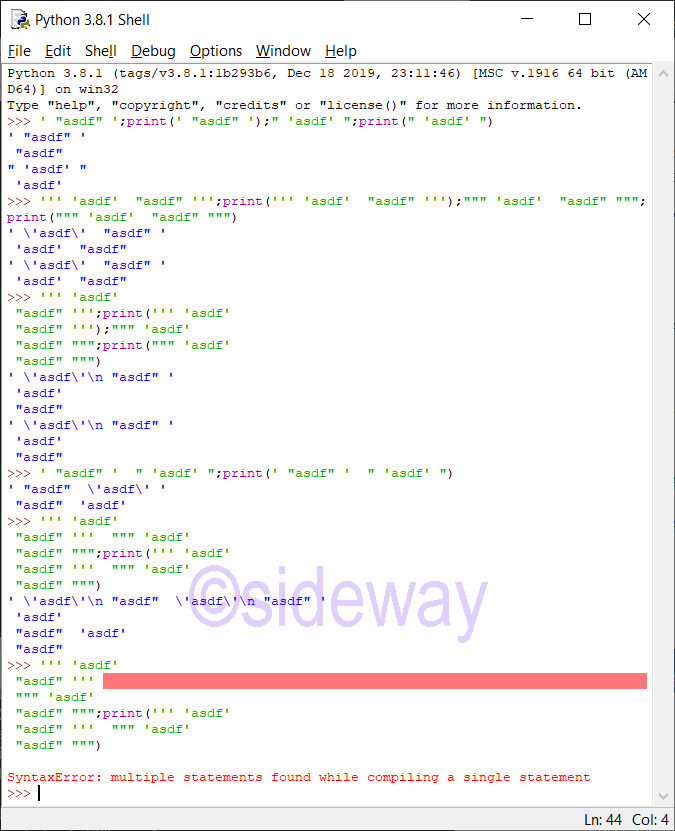
Python strings may be constructed by string literals.
String LiteralsSingle quotes: For allowing embedded double quotes. e.g. 'allows embedded "double" quotes'
Double quotes: For allowing embedded single quotes. e.g. "allows embedded 'single' quotes"
Triple quoted: For allowing embedded single and double quotes. Besides triple quoted strings may span multiple lines and all associated whitespace will be included in the string literal. e.g. '''Three single quotes''', """Three double quotes"""
Besides, a single expression of several textual literals separated by whitespace only will be implicitly converted to a single textual literal.
Python String Constructor
class str
class str(object='')
Parameter
class strTo return a string version of object. The behavior of str() depends on whether the arguments, encoding or errors is given or not.
object=''To specify a textual string object. Default object is an empty string objects
Remarks
- For calling
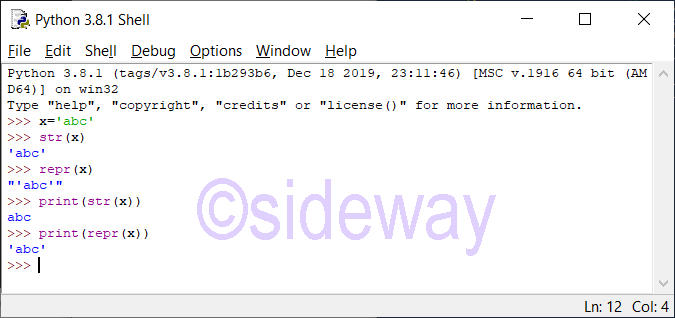
str() function with neither encoding nor errors argument is given, the str(object) function returns object.__str__(), the informal readable printing string representation of the object. If the given object is a string object, the return is the string itself. If object does not have a __str__() method, then str() returns repr(object), the formal Python informative string presentation of the object.
- When calling
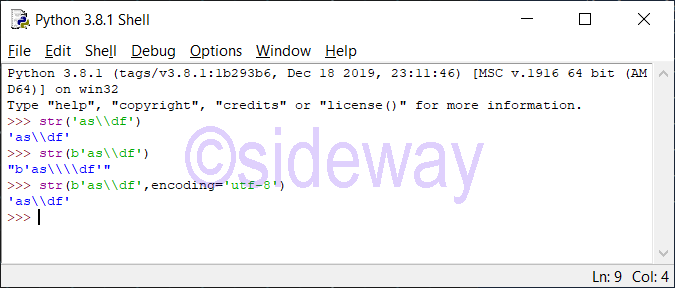
str() function with neither encoding nor errors argument is given for a bytes-like object, the str() function returns the informal string representation.
Python Strings Methods
Text sequence, the textual string sequence support, all common sequence operations. Additional methods are also provided for manipulating the typical properties of textual string sequence.
𝑠𝑡𝑟.capitalize()to return a string from 𝑠𝑡𝑟 with its first character titlecased(capitalized) and the rest lowercased. In other words, only the first letter of a character, e.g. digraphs Dz, will be capitalized, instead of the whole character.
𝑠𝑡𝑟.casefold()to return a string from 𝑠𝑡𝑟 with its characters are all casefolded. Casefolded strings may be used for caseless matching, because casefolding is intended to remove all case distinctions in a string. e.g. latin small letter sharp s, ß, will be casefolded to "ss". The casefolding algorithm follows section 3.13 of the Unicode Standard.
𝑠𝑡𝑟.center(width[, fillchar])to return a string from 𝑠𝑡𝑟 with the whole string is centered within the specified length width by padding with the optional specified fillchar. The default fillchar is an ASCII space. If the specified width is less than or equal to len(𝑠𝑡𝑟), then the orginal string 𝑠𝑡𝑟 is returned.
𝑠𝑡𝑟.count(sub[, start[, end]])to return the number of non-overlapping occurrences of the specified substring sub in 𝑠𝑡𝑟 within the optional range specified by one argument start, or two arguments start and end.
𝑠𝑡𝑟.encode(encoding="utf-8", errors="strict")to return a bytes object from 𝑠𝑡𝑟 with its string is encoded according to the specified encoding and error. Default encoding is utf-8. There are also other possible encodings. Default errors is strict, encoding errors always raise a UnicodeError. Other possible errors values are ignore, replace, xmlcharrefreplace, backslashreplace, and any other name registered via codecs.register_error().
𝑠𝑡𝑟.endswith(suffix[, start[, end]])to return a True if the speicified suffix is found at the end of 𝑠𝑡𝑟 within the optional range specified by one argument start, or two arguments start and end, otherwise return a False. The specified suffix can also be a tuple of suffixes being look for.
𝑠𝑡𝑟.expandtabs(tabsize=8)to return a string from 𝑠𝑡𝑟 with all tab characters are replaced by one or more spaces according to the specified tabsize and the column position of the tab character. The default tabsize is 8. In other words, tab column positions are at 0, 8, ⋯. A tab character will always be will replaced by one to tabsize spaces such that the last added space will always be the space be next tab column position.
𝑠𝑡𝑟.find(sub[, start[, end]])to return the lowest index of sub in 𝑠𝑡𝑟 within the optional range specified by one argument start, or two arguments start and end. -1 will be returned if sub is not found.
𝑠𝑡𝑟.format(*args, **kwargs)to return a string from 𝑠𝑡𝑟 by performing a string formatting operation. literal text or replacement fields delimited by braces {}. Each replacement field contains either the numeric index of a positional argument, or the name of a keyword argument.
When formatting a number (int, float, complex, decimal.Decimal and subclasses) with the n type (ex: '{:n}'.format(1234)), the function temporarily sets the LC_CTYPE locale to the LC_NUMERIC locale to decode decimal_point and thousands_sep fields of localeconv() if they are non-ASCII or longer than 1 byte, and the LC_NUMERIC locale is different than the LC_CTYPE locale. This temporary change affects other threads.
Changed in version 3.7: When formatting a number with the n type, the function sets temporarily the LC_CTYPE locale to the LC_NUMERIC locale in some cases.
𝑠𝑡𝑟.format_map(mapping)to return a string from 𝑠𝑡𝑟 by performing a string formatting operation through mapping to a dictionary. The operation is similar to 𝑠𝑡𝑟.format(**mapping), except that mapping is used directly and not copied to a dict.
𝑠𝑡𝑟.index(sub[, start[, end]])to return the lowest index of sub in 𝑠𝑡𝑟 within the optional range specified by one argument start, or two arguments start and end. But will raise ValueError instead of -1 while using 𝑠𝑡𝑟.find(sub[, start[, end]])) if sub is not found.
𝑠𝑡𝑟.isalnum()to return a True if all characters in 𝑠𝑡𝑟, which has at least one character, are alphanumeric characters, otherwise return a False. A character 𝑐 is alphanumeric only if 𝑐.isalpha(), 𝑐.isdecimal(), 𝑐.isdigit(), or 𝑐.isnumeric() returns a True.
𝑠𝑡𝑟.isalpha()to return a True if all characters in 𝑠𝑡𝑟, which has at least one character, are alphabetic characters, otherwise return a False.
Alphabetic characters are those characters defined in the Unicode character database as “Letter”, i.e., those with general category property being one of “Lm”, “Lt”, “Lu”, “Ll”, or “Lo”. Note that this is different from the “Alphabetic” property defined in the Unicode Standard.
𝑠𝑡𝑟.isascii()to return a True if 𝑠𝑡𝑟 is empty or all characters in 𝑠𝑡𝑟, are ASCII characters, otherwise return a False. ASCII characters have code points in the range U+0000-U+007F.
𝑠𝑡𝑟.isdecimal()to return a True if all characters in 𝑠𝑡𝑟, which has at least one character, are decimal characters, otherwise return a False.
Decimal characters are those that can be used to form numbers in base 10, e.g. U+0660, ARABIC-INDIC DIGIT ZERO. Formally a decimal character is a character in the Unicode General Category “Nd”.
𝑠𝑡𝑟.isdigit()to return a True if all characters in 𝑠𝑡𝑟, which has at least one character, are digits, otherwise return a False.
Digits include decimal characters and digits that need special handling, such as the compatibility superscript digits. This covers digits which cannot be used to form numbers in base 10, like the Kharosthi numbers. Formally, a digit is a character that has the property value Numeric_Type=Digit or Numeric_Type=Decimal.
𝑠𝑡𝑟.isidentifier()to return a True if 𝑠𝑡𝑟 is a valid identifier according to the language definition, section identifiers, and keywords.
𝑠𝑡𝑟.islower()to return a True if all cased characters in 𝑠𝑡𝑟, which has at least one character, are lowercase, otherwise return a False
𝑠𝑡𝑟.isnumeric()to return a True if all characters in 𝑠𝑡𝑟, which has at least one character, are numeric characters, otherwise return a False.
Numeric characters include digit characters, and all characters that have the Unicode numeric value property, e.g. U+2155, VULGAR FRACTION ONE FIFTH. Formally, numeric characters are those with the property value Numeric_Type=Digit, Numeric_Type=Decimal or Numeric_Type=Numeric.
𝑠𝑡𝑟.isprintable()to return a True if all characters in 𝑠𝑡𝑟, which has at least one character, are printable, otherwise return a False.
Nonprintable characters are those characters defined in the Unicode character database as “Other” or “Separator”, excepting the ASCII space (0x20) which is considered printable. (Note that printable characters in this context are those which should not be escaped when repr() is invoked on a string. It has no bearing on the handling of strings written to sys.stdout or sys.stderr.)
𝑠𝑡𝑟.isspace()to return a True if all characters in 𝑠𝑡𝑟, which has at least one character, are whitespace characters only, otherwise return a False.
A character is whitespace if in the Unicode character database (see unicodedata), either its general category is Zs (“Separator, space”), or its bidirectional class is one of WS, B, or S.
𝑠𝑡𝑟.istitle()to return a True if the 𝑠𝑡𝑟, which has at least one character, is a titlecased string, otherwise return a False.
Note: uppercase characters may only follow uncased characters and lowercase characters only cased ones.
𝑠𝑡𝑟.isupper()to return a True if all cased characters in 𝑠𝑡𝑟, which has at least one character, are uppercase characters, otherwise return a False.
𝑠𝑡𝑟.join(iterable)to return a concatenated string by concatenating the strings in iterable with delimiter 𝑠𝑡𝑟. A TypeError will be raised if there are any non-string values in iterable, including bytes objects.
𝑠𝑡𝑟.ljust(width[, fillchar])to return a string from 𝑠𝑡𝑟 with the whole string is left justified within the specified length width by padding with the optional specified fillchar. The default fillchar is an ASCII space. If the specified width is less than or equal to len(𝑠𝑡𝑟), then the orginal string 𝑠𝑡𝑟 is returned.
𝑠𝑡𝑟.lower()to return a string from 𝑠𝑡𝑟 with all cased character are converted to lowercase.
The lowercasing algorithm used is described in section 3.13 of the Unicode Standard.
𝑠𝑡𝑟.lstrip([chars])to return a string from 𝑠𝑡𝑟 with the optional specified leading characters chars are removed until reaching a string character that is not contained in the set of characters in chars. The default chars is whitespace, if argument chars is omitted or None. Argument chars is used to specify all combinations of the set of characters to be stripped from, not a specific prefix string to be removed.
static 𝑠𝑡𝑟.maketrans(x[, y[, z]]) This static method returns a translation table usable for 𝑠𝑡𝑟.translate().
If there is only one argument, it must be a dictionary mapping Unicode ordinals (integers) or characters (strings of length 1) to Unicode ordinals, strings (of arbitrary lengths) or None. Character keys will then be converted to ordinals.
If there are two arguments, they must be strings of equal length, and in the resulting dictionary, each character in x will be mapped to the character at the same position in y. If there is a third argument, it must be a string, whose characters will be mapped to None in the result.
𝑠𝑡𝑟.partition(sep)to return a 3-tuple from 𝑠𝑡𝑟 by spliting the string into three parts, with the first tuple is the part before the first occurrence of specified sep, the second tuple is the separator sep, and the third tuple is the part after the first occurrence of specified sep. If the separator is not found, then a 3-tuple with the string itself, followed by two empty strings will be returned.
𝑠𝑡𝑟.replace(old, new[, count])to return a string from 𝑠𝑡𝑟 with the specified substring old is replaced by the specified substring new according to the optional specified count occurrences from the beginnine of string. By default, all occurrences will be replaced if argument count is not given.
𝑠𝑡𝑟.rfind(sub[, start[, end]])to return the highest index of sub in 𝑠𝑡𝑟 within the optional range specified by one argument start, or two arguments start and end. -1 will be returned if sub is not found.
𝑠𝑡𝑟.rindex(sub[, start[, end]])to return the lowest index of sub in 𝑠𝑡𝑟 within the optional range specified by one argument start, or two arguments start and end. But will raise ValueError instead of -1 while using 𝑠𝑡𝑟.find(sub[, start[, end]])) if sub is not found.
𝑠𝑡𝑟.rjust(width[, fillchar])to return a string from 𝑠𝑡𝑟 with the whole string is right justified within the specified length width by padding with the optional specified fillchar. The default fillchar is an ASCII space. If the specified width is less than or equal to len(𝑠𝑡𝑟), then the orginal string 𝑠𝑡𝑟 is returned.
𝑠𝑡𝑟.rpartition(sep)to return a 3-tuple from 𝑠𝑡𝑟 by spliting the string into three parts, with the first tuple is the part before the last occurrence of specified sep, the second tuple is the separator sep, and the third tuple is the part after the last occurrence of specified sep. If the separator is not found, then a 3-tuple with two empty strings, followed by the string itself will be returned.
𝑠𝑡𝑟.rsplit(sep=None, maxsplit=-1)to return a list of the words from 𝑠𝑡𝑟 by spliting with the specified delimiter sep according to the given count maxsplit. In other words, the list will have at most maxsplit+1 elements, the rightmost ones. If maxsplit is not specified or equal to -1, then all possible splits will be carried out. Splitting an empty string will always returns a list with an empty string. If delimiter sep is given, spliting two consecutive delimiters in 𝑠𝑡𝑟 will return an empty string. The delimiter argument sep may be multiple characters.
If sep is not specified or is None, any whitespace string is a separator. A different splitting algorithm is applied: runs of consecutive whitespace are regarded as a single separator, and the result will contain no empty strings at the start or end if the string has leading or trailing whitespace. Consequently, splitting an empty string or a string consisting of just whitespace with a None separator returns [].
𝑠𝑡𝑟.rstrip([chars])to return a string from 𝑠𝑡𝑟 with the optional specified trailing characters chars are removed until reaching a string character that is not contained in the set of characters in chars. The default chars is whitespace, if argument chars is omitted or None. Argument chars is used to specify all combinations of the set of characters to be stripped from, not a specific prefix string to be removed.
𝑠𝑡𝑟.split(sep=None, maxsplit=-1)to return a list of the words from 𝑠𝑡𝑟 by spliting with the specified delimiter sep according to the given count maxsplit. In other words, the list will have at most maxsplit+1 elements. If maxsplit is not specified or equal to -1, then all possible splits will be carried out. Splitting an empty string will always returns a list with an empty string. If delimiter sep is given, spliting two consecutive delimiters in 𝑠𝑡𝑟 will return an empty string. The delimiter argument sep may be multiple characters.
If sep is not specified or is None, if delimiter sep is not specified or None, any whitespace string is a separator. A different splitting algorithm is applied: runs of consecutive whitespace are regarded as a single separator, and the result will contain no empty strings at the start or end if the string has leading or trailing whitespace. Consequently, splitting an empty string or a string consisting of just whitespace with a None separator returns [].
𝑠𝑡𝑟.splitlines([keepends])to return a list of the lines from 𝑠𝑡𝑟 by breaking at line boundaries. Line boundaries is a superset of universal boundaries, e.g. \n Line Feed, \r Carriage Return, \r\n Carriage Return + Line Feed, \v or \x0b Line Tabulation, \f or \x0c Form Feed, \x1c File Separator, \x1d Group Separator, \x1e Record Separator, \x85 Next Line (C1 Control Code), \u2028 Line Separator, \u2029 Paragraph Separator etc. Line breask are not included in the resulting list unless argument keepends is given and true. Unlike split() splitlines returns an empty list for the empty string, and a terminal line break does not result in an extra line
𝑠𝑡𝑟.startswith(prefix[, start[, end]])to return a True if 𝑠𝑡𝑟 starts with the given prefix within the optional range specified by one argument start, or two arguments start and end, otherwise return False.
𝑠𝑡𝑟.strip([chars])to return a string from 𝑠𝑡𝑟 with the optional specified leading and trailing characters chars are removed until reaching a string character that is not contained in the set of characters in chars. The default chars is whitespace, if argument chars is omitted or None. Argument chars is used to specify all combinations of the set of characters to be stripped from, not a specific prefix or suffix string to be removed.
𝑠𝑡𝑟.swapcase()to return a string from 𝑠𝑡𝑟 with uppercase characters converted to lowercase and vice versa. However, it is not necessarily true that s.swapcase().swapcase() == s.
𝑠𝑡𝑟.title()to return a string from 𝑠𝑡𝑟 by converting to a titlecased version with all words are of first uppercase character and others lowercase characters.
The algorithm uses a simple language-independent definition of a word as groups of consecutive letters. The definition works in many contexts but it means that apostrophes in contractions and possessives form word boundaries, which may not be the desired result:
>>>
>>> "they're bill's friends from the UK".title()
"They'Re Bill'S Friends From The Uk"
A workaround for apostrophes can be constructed using regular expressions:
>>>
>>> import re
>>> def titlecase(s):
... return re.sub(r"[A-Za-z]+('[A-Za-z]+)?",
... lambda mo: mo.group(0).capitalize(),
... s)
...
>>> titlecase("they're bill's friends.")
"They're Bill's Friends."
𝑠𝑡𝑟.translate(table)to return a string from 𝑠𝑡𝑟 by mapping each character to a given translation table table.
The table must be an object that implements indexing via __getitem__(), typically a mapping or sequence. When indexed by a Unicode ordinal (an integer), the table object can do any of the following: return a Unicode ordinal or a string, to map the character to one or more other characters; return None, to delete the character from the return string; or raise a LookupError exception, to map the character to itself.
You can use 𝑠𝑡𝑟.maketrans() to create a translation map from character-to-character mappings in different formats.
See also the codecs module for a more flexible approach to custom character mappings.
𝑠𝑡𝑟.upper()to return a string from 𝑠𝑡𝑟 with all cased characters are converted to uppercase.
Note that s.upper().isupper() might be False if s contains uncased characters or if the Unicode category of the resulting character(s) is not “Lu” (Letter, uppercase), but e.g. “Lt” (Letter, titlecase).
The uppercasing algorithm used is described in section 3.13 of the Unicode Standard.
𝑠𝑡𝑟.zfill(width)to return a string of the specified length width from 𝑠𝑡𝑟 by left filling with ASCII '0' digits. A leading sign prefix ('+'/'-') is handled by inserting the padding after the sign character rather than before. If the specified width is less than or equal to len(𝑠𝑡𝑟), then the orginal string 𝑠𝑡𝑟 is returned.
Source and Reference
©sideway
ID: 210100017 Last Updated: 1/17/2021 Revision: 0
|
 |


 53
53 na
na na
na